Also visit: Typeflow WordPress theme
Velzon: The Ultimate Admin & Dashboard Template for Modern Applications
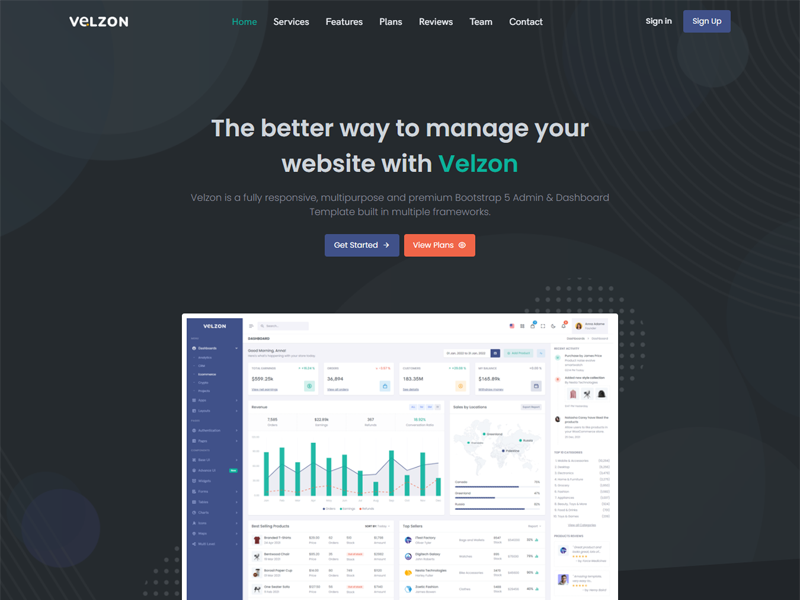
In today’s fast-paced digital landscape, effective data management and analysis are paramount for businesses striving for success. An intuitive admin dashboard is essential for monitoring performance, analyzing metrics, and driving data-driven decisions. The Velzon Admin & Dashboard Template is specifically designed to fulfill these needs, offering a robust, flexible, and aesthetically pleasing solution for developers and organizations. This article explores Velzon’s features, benefits, practical applications, and best practices for maximizing its potential.
Overview of the Velzon Admin & Dashboard Template
The Velzon template is built using the latest web technologies, including HTML5, CSS3, and JavaScript. It stands out due to its responsive design, extensive customization options, and comprehensive set of pre-built components, making it an ideal choice for a wide range of applications—from project management tools to customer relationship management (CRM) systems and e-commerce platforms.
Key Features of Velzon
. Responsive Design
Velzon’s fully responsive layout ensures that your dashboard looks impeccable on all devices, including desktops, tablets, and smartphones. This adaptability is crucial, as a significant portion of web traffic comes from mobile devices. The responsive design enhances user experience by providing seamless access to information, regardless of the device being used.
. Customizable Layouts
The template offers multiple layout options, including vertical or horizontal navigation and boxed or fluid designs. This flexibility allows developers to create a dashboard that aligns perfectly with project requirements and branding guidelines. Users can choose the layout that best suits their workflow, enhancing usability.
. Comprehensive UI Components
Velzon includes a vast library of pre-built UI components, such as buttons, forms, tables, charts, and notifications. These components simplify the development process, allowing developers to focus on functionality rather than spending time on design. The extensive selection ensures that users have all the necessary elements to create a robust dashboard.
. Integrated Charting Libraries
Data visualization is critical for effective analysis, and Velzon supports popular charting libraries like Chart.js and ApexCharts. This integration enables users to create dynamic visualizations that convey complex data in easily digestible formats, such as line graphs, bar charts, and pie charts. Visualizing data helps stakeholders grasp insights quickly.
. User-Friendly Interface
Designed with usability in mind, Velzon features an intuitive layout that facilitates effortless navigation. Clear labeling, organized sections, and a coherent design ensure that users can locate the information they need promptly, enhancing overall efficiency.
Benefits of Using the Velzon Admin & Dashboard Template
. Time Efficiency
By providing a wide range of pre-built components and layouts, Velzon significantly reduces the time required to create admin dashboards. Developers can focus on implementing features and functionality rather than spending time on design.
. Cost-Effective Solution
Utilizing a ready-made template like Velzon minimizes the need for extensive design and development efforts, resulting in significant cost savings for businesses. The reduced time to market can also provide a competitive edge.
. Enhanced User Experience
The responsive design and user-friendly interface ensure that users can navigate the dashboard effortlessly. This leads to increased productivity and satisfaction, as users can find and analyze information quickly.
. Scalability
Velzon is designed to be scalable, making it suitable for projects of all sizes. Whether you’re developing a small application or a complex enterprise solution, the template can accommodate your evolving needs.
. Consistent Updates
The Velzon template receives regular updates to maintain compatibility with the latest technologies and design trends. This ongoing support helps keep your application relevant and secure.
Getting Started with Velzon
. Download and Install
Begin by downloading the Velzon template from a trusted source. Follow the installation instructions provided in the documentation to set it up on your web server. The process is straightforward, even for those with limited technical experience.
. Choose a Layout
Explore the various layout options available within the template. Select a design that best aligns with your project requirements and user preferences. Consider how different layouts may impact user interaction and accessibility.
. Customize Components
Utilize the pre-built components to create the necessary UI elements for your dashboard. Adjust styles, colors, and layouts to reflect your branding and ensure a cohesive user experience.
. Implement Data Visualization
Integrate charting libraries to create dynamic visualizations for your data. Customize the charts to display key metrics that are most relevant to your users. Visual representations can significantly enhance comprehension and engagement.
. Add User Authentication
Implement user authentication features to ensure secure access to the dashboard. Velzon can easily integrate with existing authentication systems, allowing you to manage user roles and permissions effectively.
. Test Responsiveness
Before launching your dashboard, test its responsiveness across various devices and browsers. Ensuring a consistent user experience is crucial for maintaining user satisfaction.
. Launch and Monitor
Once you’re satisfied with the design and functionality, launch your dashboard! Monitor user feedback and analytics to make informed adjustments and improvements. Continuous monitoring can help identify areas for enhancement.
Best Practices for Using Velzon
. Maintain Simplicity: While Velzon offers numerous features, aim for a clean and straightforward interface. Overloading the dashboard with too much information can overwhelm users and detract from usability.
. Regular Updates: Keep your dashboard template updated to benefit from new features, security enhancements, and bug fixes. Regular maintenance is key to keeping your application functional and secure.
. Focus on Usability: Prioritize user experience by incorporating intuitive navigation and clear labeling of elements. Consider user feedback when making design decisions to ensure the dashboard meets their needs.
. Optimize Performance: Ensure that your dashboard loads quickly by optimizing images, minimizing code, and utilizing caching techniques. A fast-loading dashboard enhances user satisfaction and engagement.
. Utilize Analytics: Implement analytics tools to track user behavior and engagement within your dashboard. This data can provide valuable insights into how to improve functionality and user experience over time.
Real-World Applications of Velzon
. Project Management Tools
Companies can utilize Velzon to create project management dashboards that track timelines, resource allocation, and team performance. This helps ensure that projects stay on track and within budget.
. Customer Relationship Management (CRM)
Businesses can develop CRM systems using Velzon to manage customer interactions, sales data, and support requests efficiently. A well-designed CRM dashboard can enhance customer satisfaction and retention.
. E-commerce Analytics
E-commerce platforms can leverage the template to monitor sales performance, track inventory, and analyze customer behavior in real-time. Effective data analysis can lead to improved marketing strategies and sales outcomes.
. Financial Dashboards
Financial institutions can create dashboards for managing budgets, analyzing investments, and tracking market trends. Real-time data access allows for better financial decision-making.
. Healthcare Management Systems
Healthcare providers can use Velzon to develop dashboards for managing patient data, appointment scheduling, and resource allocation. A streamlined dashboard can enhance operational efficiency in healthcare settings.