Also visit: Enovia WordPress Theme
Techwix HTML Template: A Comprehensive Guide for Tech Websites
In the fast-paced world of technology, having an engaging and user-friendly website is essential for tech companies, startups, and digital product developers. Whether you’re showcasing a new software product, offering IT services, or running a tech blog, the Techwix HTML Template offers an ideal solution for building a professional and functional website. In this article, we’ll explore the key features, benefits, and practical steps to using the Techwix HTML Template for your tech-related online presence.
What is Techwix HTML Template?
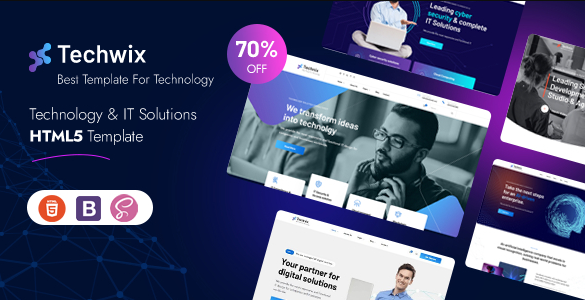
The Techwix HTML Template is a sleek and modern web template designed specifically for tech-focused websites. Whether you’re launching a website for a tech startup, software company, or a digital agency, this template offers a wide range of customization options and pre-designed layouts to help you get started quickly. Techwix comes equipped with essential sections for product showcases, services, team introductions, and blog posts, making it an excellent all-in-one solution for any technology website.
Key Features of Techwix HTML Template
. Fully Responsive Design
The Techwix HTML Template is designed to be fully responsive, ensuring that your website functions and looks perfect on any device. Whether visitors are browsing on a desktop, tablet, or smartphone, the layout automatically adjusts to fit the screen. This responsiveness enhances the user experience and ensures you reach a broader audience.
. Modern and Clean Design
Techwix boasts a modern, clean, and minimalist design that fits perfectly with the tech industry’s aesthetic. With its focus on simplicity and usability, the template avoids clutter and distractions, allowing visitors to focus on your content and services. The sharp, professional layout helps establish trust with potential clients and users.
. Customizable Layouts
The Techwix template offers a variety of pre-designed page layouts, including homepages, product showcases, service offerings, team pages, and contact forms. These layouts are fully customizable, allowing you to tweak every aspect of the design, from colors and fonts to images and content structure. This flexibility ensures that you can tailor your site to match your brand’s identity perfectly.
. Service and Product Sections
For tech companies offering services or products, the template comes with dedicated sections for showcasing your offerings. Whether you’re advertising a new software product or IT solutions, you can use these sections to clearly outline your services with visually appealing icons, descriptions, and calls-to-action.
. Blog and News Section
In the tech industry, staying updated with the latest trends is crucial. Techwix includes a blog layout where you can publish articles, news, updates, and industry insights. Maintaining a blog not only helps establish your authority in the tech space but also improves your site’s SEO, driving more organic traffic to your website.
. SEO-Optimized
The Techwix HTML Template is designed with SEO (Search Engine Optimization) best practices in mind. Its clean, well-structured code ensures that search engines can easily crawl and index your site. Additionally, features like fast loading speeds, mobile-friendliness, and optimized images contribute to better rankings in search engine results, helping you attract more visitors.
. Cross-Browser Compatibility
Techwix ensures consistent performance across all major browsers, including Chrome, Firefox, Safari, and Microsoft Edge. This cross-browser compatibility guarantees that your website will function properly for all users, regardless of their preferred browser.
. Portfolio and Case Study Pages
For companies offering tech solutions, case studies and portfolios are essential for showcasing successful projects. Techwix provides ready-made layouts for displaying your portfolio of past work or case studies. These sections allow potential clients to see the results you’ve achieved, boosting credibility and fostering trust.
. Contact Forms and CTAs
Converting visitors into leads is a key goal of any tech website. Techwix includes built-in, customizable contact forms and strategically placed calls-to-action (CTAs) to encourage users to reach out, sign up for newsletters, or request consultations. This functionality helps increase engagement and conversions.
Benefits of Using Techwix HTML Template
. Time and Cost Efficiency
Building a website from scratch can be costly and time-consuming. Techwix offers a cost-effective solution, providing you with a ready-made framework that you can quickly customize to suit your needs. With its easy-to-use design, you can save valuable time that would otherwise be spent on coding and designing.
. User-Friendly Interface
The Techwix template is designed to be user-friendly, even for non-technical users. With a straightforward structure and clear documentation, it’s easy to navigate through customization options and manage your website’s content. This makes it an excellent choice for startups or small tech companies that may not have in-house developers.
. Scalability and Flexibility
Techwix is built with scalability in mind, meaning it can grow as your business grows. Whether you’re a startup launching your first product or an established tech company expanding your services, Techwix can easily adapt to your evolving needs. The flexible design allows for the addition of new features, sections, and content without overhauling the entire site.
. Professional and Modern Appearance
In the competitive world of technology, first impressions matter. A well-designed, professional website reflects your brand’s expertise and reliability. Techwix’s sleek and modern design ensures that your website looks cutting-edge, helping you stand out from the competition and instilling confidence in your clients.
. Increased Engagement and Conversion
With its integrated contact forms, clear CTAs, and engaging layouts, Techwix helps guide visitors through your site’s content and encourages interaction. Whether it’s downloading a white paper, signing up for a demo, or contacting your sales team, the template is designed to convert visitors into leads.
. Great for Showcasing Products and Services
Techwix excels at showcasing tech products and services. With dedicated sections for product features, benefits, and pricing, you can clearly communicate the value of your offerings. This is particularly useful for SaaS (Software as a Service) businesses, IT solution providers, and digital product developers who need to explain complex features in a simple and engaging manner.
. Strong Community and Support
Techwix is backed by a strong community of users and developers. If you ever run into challenges or need help with customization, there are plenty of resources available, including detailed documentation, tutorials, and community forums. This support ensures you can quickly resolve issues and get the most out of the template.
How to Use Techwix HTML Template Effectively
: Installation
After purchasing and downloading the Techwix HTML Template, unzip the files and upload them to your web hosting server using FTP or a file manager. Ensure your hosting plan supports HTML to avoid compatibility issues.
: Customize Your Layout
Once installed, you can begin customizing the template to align with your brand’s identity. Modify colors, fonts, logos, and images to reflect your company’s style. Edit text and content in the provided layouts to suit your specific needs. The flexibility of Techwix allows you to create a site that feels unique to your business.
: Add Product or Service Information
Make sure to fill in all the necessary information about your products or services. Use the dedicated sections for product descriptions, features, pricing, and benefits. Adding high-quality images, demos, or even videos can enhance user understanding and increase engagement.
: Optimize for SEO
SEO is critical for increasing your website’s visibility. Use relevant keywords throughout your site’s headings, meta descriptions, and content. Compress images and enable caching for faster loading times. Regularly update your blog section with valuable content to keep your website fresh and attractive to search engines.
: Test Your Website Across Devices and Browsers
Before launching, thoroughly test your website on different devices (desktops, tablets, smartphones) and browsers. This ensures that everything works smoothly and looks consistent for all users. Make sure to test all forms, buttons, and CTAs to ensure they are functioning correctly.
: Launch and Promote
After you’re satisfied with your site, it’s time to launch! Promote your website through social media channels, email marketing, and other digital marketing strategies. You can also optimize your blog section for long-term SEO growth, driving more traffic to your website.