Also visit: Acronix WordPress Theme
Kanop HTML Template: The Ultimate Solution for Modern Websites
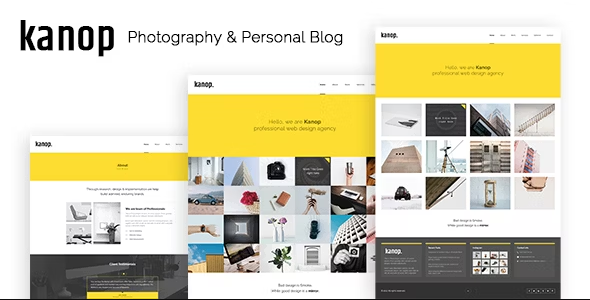
In today’s digital world, having an engaging and functional website is crucial for any business. The Kanop HTML template stands out as a versatile, modern solution tailored for various industries, including creative agencies, portfolios, e-commerce, and corporate sites. Built with HTML5, CSS3, and Bootstrap, Kanop provides a responsive design that adapts seamlessly across all devices. This article delves into the features, benefits, and best practices for leveraging the Kanop HTML template effectively.
Overview of the Kanop HTML Template
The Kanop HTML template is designed for users who seek to create visually stunning and highly functional websites without extensive coding knowledge. Its user-friendly structure, combined with elegant design elements, allows businesses to establish a strong online presence that captivates visitors. Whether you’re a freelancer, a small business, or a large corporation, Kanop can cater to your specific needs.
Key Features of the Kanop HTML Template
. Responsive Design: The Kanop template is fully responsive, ensuring a consistent user experience across all devices—smartphones, tablets, and desktops. This adaptability is crucial, as a significant portion of web traffic comes from mobile devices.
. Pre-built Page Layouts: Kanop offers a variety of pre-designed page layouts, including home pages, service pages, about us, portfolios, blogs, and contact pages. These templates save time and simplify the website development process.
. SEO Optimized: The template is built with SEO best practices in mind. It features clean code, proper heading structures, and optimized meta tags, all of which help improve search engine rankings.
. Cross-Browser Compatibility: The Kanop template works seamlessly across all major web browsers, including Chrome, Firefox, Safari, and Edge. This ensures that your website can be accessed by a broad audience without technical issues.
. Customizable Elements: Users can easily customize colors, fonts, and layouts using simple CSS adjustments. This flexibility allows businesses to align the site’s design with their brand identity.
. Integrated Blog Section: The template includes a dedicated blog section, allowing businesses to share news, updates, and industry insights. This feature helps improve engagement and keeps the website content fresh.
. Contact Forms and Google Maps Integration: Kanop provides built-in contact forms, making it easy for visitors to reach out. Additionally, Google Maps integration allows businesses to display their location, enhancing user convenience.
. High-Quality Documentation: The Kanop template comes with comprehensive documentation that guides users through installation and customization. This support minimizes the learning curve, making it accessible even for beginners.
. Social Media Integration: Easily incorporate social media links and sharing options to boost engagement and connect with your audience on various platforms.
Benefits of Using the Kanop HTML Template
. Time-Saving: With its pre-built layouts and components, the Kanop template significantly reduces the time needed to launch a website. Users can focus on content creation rather than design from scratch.
. Cost-Effective: Investing in a template like Kanop eliminates the need for extensive web development services, saving money while still achieving a professional look.
. Enhanced User Experience: The responsive design and user-friendly interface ensure that visitors can navigate the site easily, leading to increased engagement and lower bounce rates.
. Versatile Applications: Whether you run a creative agency, a blog, or an e-commerce site, the Kanop template is adaptable for various industries and purposes.
. Regular Updates: The Kanop template is regularly updated to stay in line with the latest design trends and technologies, ensuring that your website remains modern and functional.
Getting Started with the Kanop HTML Template
. Download and Install: Begin by downloading the Kanop template from a reputable source. Follow the installation instructions provided in the documentation to upload the files to your web hosting server.
. Choose a Layout: Explore the different page layouts included in the template. Select the one that best suits your business needs and brand identity.
. Customize Content: Replace placeholder content with your own text, images, and branding elements. Use the customization options to adjust colors, fonts, and layouts to match your branding.
. SEO Optimization: Optimize your website for search engines by editing meta tags, adding alt texts for images, and ensuring proper heading structures throughout your content.
. Test Responsiveness: Before launching, test your site across various devices and browsers to ensure consistent performance and user experience.
. Launch and Promote: Once you’re satisfied with the design and functionality, launch your site! Promote it through social media, email newsletters, and other marketing channels to attract visitors.
Best Practices for Using the Kanop HTML Template
. Keep It Simple: While the template allows for extensive customization, aim for a clean and straightforward design. Overloading the site with elements can detract from the user experience.
. Regular Maintenance: Regularly update your template and website content to ensure security and functionality. Keeping your site fresh and relevant is key to retaining visitors.
. Quality Content Creation: Focus on producing high-quality, engaging content that resonates with your audience. This will not only improve SEO but also foster user loyalty.
. Engage with Your Audience: Incorporate interactive elements such as surveys, contact forms, and comment sections to engage visitors and encourage feedback.
. Monitor Performance: Utilize analytics tools to track your website’s performance, user behavior, and engagement metrics. This data will inform your future content and design decisions.
Real-World Applications of the Kanop HTML Template
. Creative Agencies: Design agencies can showcase their portfolios, highlight services, and attract clients through visually stunning layouts and engaging content.
. Freelancers and Portfolios: Freelancers can create personal portfolio websites to display their work, share testimonials, and connect with potential clients.
. E-Commerce Sites: Small businesses can utilize the template to set up an online store, presenting products in an appealing manner while integrating payment options.
. Blogs and News Sites: Content creators can take advantage of the integrated blog section to share articles, tutorials, and industry news, keeping their audience informed and engaged.
. Corporate Websites: Businesses can use Kanop to establish a professional online presence, detailing their services, history, and contact information in an accessible manner.
Enhancing User Engagement with Kanop
To maximize the effectiveness of the Kanop template, focus on enhancing user engagement. Incorporate features such as:
. Customer Testimonials: Display positive feedback from clients to build trust and credibility.
. Interactive Elements: Use sliders, carousels, and tabs to present information dynamically, keeping users engaged.
. Call-to-Action Buttons: Strategically place CTAs throughout the site to guide users toward taking specific actions, such as signing up for newsletters or making a purchase.