Also read: Landscape Blogger Template
. A Comprehensive Overview of the Hestia WordPress Theme
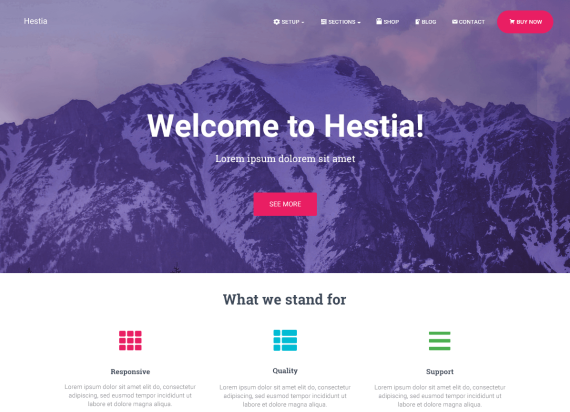
The Hestia WordPress Theme is a modern and stylish theme designed for businesses and professionals who want to create a strong online presence. This comprehensive overview explores its key features, including its sleek one-page design, which allows for a streamlined and engaging user experience. Hestia offers a range of customization options, from its built-in live customizer to various pre-designed sections that can be easily adjusted to fit your brand’s identity. The theme is fully responsive, ensuring that your site looks great on all devices, from smartphones to desktop computers. Additionally, Hestia integrates seamlessly with popular page builders like Elementor and offers compatibility with WooCommerce, making it an excellent choice for e-commerce websites. This article will walk you through Hestia’s features, setup process, and how to leverage its tools to create a professional and appealing website.
. Why Hestia is Perfect for Startups and Small Businesses
For startups and small businesses looking to establish an online presence, the Hestia WordPress Theme offers a compelling solution. This article explores why Hestia is particularly suited for new businesses. Its one-page design provides a clear and concise way to present business information, services, and contact details. The theme’s modern and clean aesthetics create a professional image that helps build credibility with potential clients and customers. Hestia’s easy customization options, including drag-and-drop functionality through Elementor, allow you to tailor your site’s appearance to match your brand. Additionally, the theme’s responsive design ensures that your site performs well on all devices, enhancing user experience. With its built-in support for WooCommerce, Hestia also enables small businesses to set up an online store with ease.
. Setting Up Your Website with Hestia: A Step-by-Step Guide
Setting up a website with the Hestia WordPress Theme is a straightforward process. This step-by-step guide will take you through the entire setup, from installation to customization. Begin by installing Hestia from the WordPress theme repository or by uploading the theme file. Once activated, import demo content to get a base layout for your site. Use the WordPress Customizer to adjust site settings such as colors, fonts, and layouts. Hestia’s integration with Elementor allows for drag-and-drop customization, making it easy to design pages and add content. Configure essential plugins, including those for SEO and security, to enhance your site’s performance. Finally, review and test your site on different devices to ensure it’s responsive and functions correctly. By following this guide, you’ll be able to set up a polished and professional website with Hestia.
. Exploring the Key Features of Hestia: What Makes It Stand Out
The Hestia WordPress Theme offers several features that make it stand out among other WordPress themes. This article delves into these key features, starting with its elegant one-page design that allows for a streamlined presentation of content. Hestia includes a variety of customization options through its live customizer, enabling users to adjust colors, fonts, and layout settings to fit their brand. The theme is fully responsive, ensuring a great user experience across all devices. Hestia’s compatibility with Elementor provides advanced page-building capabilities, and its integration with WooCommerce supports e-commerce functionalities. Additional features include SEO-friendly coding and support for popular plugins, making Hestia a versatile choice for creating a professional and engaging website.
. Creating an Impressive Portfolio with the Hestia WordPress Theme
For creative professionals looking to showcase their work, the Hestia WordPress Theme offers a great platform for building an impressive portfolio. This article explores how to use Hestia to create a visually appealing and functional portfolio website. Start by customizing the theme’s one-page design to highlight your projects and achievements. Use Elementor to create unique layouts for portfolio sections and add detailed descriptions for each project. Hestia’s responsive design ensures that your portfolio looks great on all devices, and its clean aesthetics provide a professional backdrop for your work. Integrate social media links and contact forms to make it easy for potential clients to get in touch. With its modern design and customization options, Hestia allows you to create a portfolio that effectively showcases your skills and attracts potential clients.
. How to Optimize Your Hestia Website for SEO
Optimizing your website for search engines is crucial for driving traffic, and the Hestia WordPress Theme offers several features to help with SEO. This article provides tips on how to optimize your Hestia site for better search engine rankings. Start by using the theme’s built-in SEO tools, such as customizable meta tags and headers. Ensure that your site’s content is keyword-rich and includes relevant phrases to improve search visibility. Leverage Hestia’s compatibility with popular SEO plugins like Yoast SEO or All in One SEO Pack to further enhance your site’s SEO capabilities. The theme’s responsive design also contributes to better mobile search rankings. Regularly update your content and monitor your site’s performance using analytics tools to make data-driven improvements. By following these SEO best practices, you can boost your site’s visibility and attract more visitors.
. The Versatility of Hestia: Adapting It for Different Types of Websites
The Hestia WordPress Theme’s versatility allows it to be adapted for various types of websites, from corporate sites to personal blogs. This article explores how Hestia can be used for different purposes. Its modern one-page design works well for business sites, providing a clean layout to present services, team members, and contact information. For personal blogs, Hestia’s customizable sections allow for an engaging presentation of posts and categories. The theme’s integration with Elementor provides the flexibility to create unique layouts for any type of website. Additionally, Hestia’s responsive design ensures that your site performs well on all devices. Whether you’re building a portfolio, e-commerce site, or a personal blog, Hestia’s features and customization options make it a suitable choice for various website types.
. Building an E-Commerce Store with Hestia: Tips and Best Practices
Hestia’s compatibility with WooCommerce makes it a strong choice for creating an online store. This article provides tips and best practices for building an e-commerce store with the Hestia WordPress Theme. Start by installing and configuring WooCommerce to handle product listings, payments, and shipping options. Use Hestia’s customizable product pages and categories to present your products in an appealing manner. The theme’s responsive design ensures a seamless shopping experience on all devices, and its integration with Elementor allows for the creation of custom product pages and checkout layouts. Enhance your store’s functionality with additional plugins for features such as product reviews, live chat, and advanced analytics. By following these best practices, you can build a successful e-commerce store that attracts and retains customers.
. Enhancing Your Hestia Website with Plugins and Extensions
The Hestia WordPress Theme is designed to work well with various plugins and extensions, allowing you to enhance your website’s functionality. This article explores some of the best plugins to use with Hestia. Start with SEO plugins like Yoast SEO or All in One SEO Pack to improve your site’s search engine rankings. Consider using performance optimization plugins such as WP Super Cache or W3 Total Cache to enhance site speed and user experience. For additional design flexibility, integrate page builders like Elementor to create custom layouts and content sections. Enhance functionality with contact form plugins like Contact Form 7 or WPForms, and consider adding social media plugins to connect with your audience. By leveraging these plugins and extensions, you can customize and enhance your Hestia-powered website to meet your specific needs.
. Why Hestia is a Great Choice for WordPress Users
The Hestia WordPress Theme is gaining popularity among WordPress users for its blend of style, functionality, and ease of use. This article explores why Hestia is a great choice. Its sleek one-page design provides a modern and professional look for various types of websites. Hestia’s integration with Elementor allows for easy drag-and-drop customization, making it accessible for users without coding skills. The theme’s responsive design ensures that your site looks great on all devices, and its compatibility with WooCommerce supports e-commerce functionalities. Built-in SEO tools and compatibility with popular plugins further enhance its value.