Also visit: Leafy Blogger Template
GeoDeo HTML Template: A Comprehensive Guide for Your Geolocation-Based Business
In today’s digital landscape, having a robust online presence is crucial for any business, especially those in the geolocation sector. The GeoDeo HTML template is designed to meet the unique needs of geolocation-based services, offering a modern, responsive solution that enhances user experience and engagement. This article explores the key features, benefits, and best practices for utilizing the GeoDeo HTML template to create a standout website for your business.
What is the GeoDeo HTML Template?
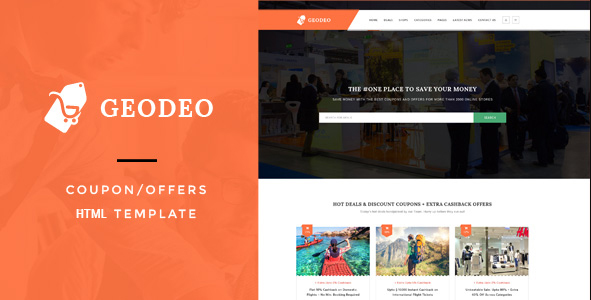
The GeoDeo HTML template is a versatile web solution tailored for businesses that leverage geolocation technologies. This template is ideal for a range of applications, including travel agencies, mapping services, real estate platforms, and location-based apps. Built with HTML5, CSS3, and Bootstrap, GeoDeo ensures a responsive and visually appealing experience across all devices.
Key Features of the GeoDeo HTML Template
. Responsive Design: The GeoDeo template is fully responsive, adapting seamlessly to various screen sizes. This ensures that users have a consistent experience whether they’re on a desktop, tablet, or smartphone.
. Pre-built Pages: The template comes with a variety of pre-designed pages, including home, about, services, blog, contact, and landing pages. These ready-to-use templates streamline the website development process and save time.
. Map Integration: One of the standout features of GeoDeo is its integration with Google Maps or similar services. This allows businesses to showcase locations, provide directions, and enhance user interaction.
. SEO Optimization: Designed with search engine optimization in mind, the GeoDeo template ensures that your website is structured for better visibility on search engines. Clean code, fast loading times, and proper tagging contribute to improved rankings.
. User-Friendly Interface: The template features a clean, modern design that prioritizes usability. Intuitive navigation and strategically placed call-to-action buttons guide users effortlessly through the site.
. Cross-Browser Compatibility: GeoDeo is compatible with all major web browsers, including Chrome, Firefox, Safari, and Edge, ensuring that your site reaches a broader audience.
. Customizable Elements: Users can easily customize various elements of the template, including colors, fonts, and layouts, allowing for a personalized touch that aligns with brand identity.
. High-Quality Support and Documentation: Comprehensive documentation accompanies the GeoDeo template, providing guidance on installation and customization. Additionally, customer support is available to assist with any technical issues.
. Social Media Integration: GeoDeo supports easy integration with social media platforms, allowing businesses to connect with their audience and promote services effectively.
Benefits of Using the GeoDeo HTML Template
. Time Efficiency: The pre-built pages and features of the GeoDeo template significantly reduce the time required to launch a website. Businesses can quickly customize and deploy their site to the public.
. Cost-Effective Solution: By providing a comprehensive package with essential features, GeoDeo eliminates the need for additional purchases or subscriptions, leading to cost savings for businesses.
. Enhanced User Experience: With its responsive design and user-friendly interface, the GeoDeo template ensures that customers can easily navigate the website and access the information they need, leading to higher satisfaction.
. Versatile Applications: While designed for geolocation services, the GeoDeo template can be adapted for various industries, including tourism, real estate, and logistics.
. Future-Proof: Regular updates ensure that the GeoDeo template remains current with the latest design trends and technologies, keeping your website functional and relevant.
Getting Started with the GeoDeo HTML Template
. Download and Install: Begin by downloading the GeoDeo template from a reputable source. Follow the provided installation instructions to upload the files to your web hosting server.
. Choose a Layout: Explore the different layout options available within the template. Select a design that aligns with your business goals and branding.
. Customize Content: Replace placeholder content with your own text, images, and branding elements. Use the customization options to adjust colors, fonts, and layouts to suit your needs.
. Integrate Map Features: Set up the integrated map features to showcase relevant locations. Ensure that the map functionality is tested to provide a smooth user experience.
. Optimize for SEO: Implement SEO best practices by optimizing meta tags, image alt texts, and content. This will help improve your site’s visibility in search engines.
. Test Responsiveness: Before launching, test your site across different devices and browsers to ensure consistent performance. This step will help identify any potential issues.
. Launch and Promote: Once you’re satisfied with the design and functionality, launch your site! Promote it through social media, online advertising, and other channels to attract visitors.
Best Practices for Using the GeoDeo HTML Template
. Maintain Simplicity: While the template offers numerous customization options, aim for a clean and straightforward design. Avoid cluttering the site with excessive elements that may overwhelm users.
. Regular Updates: Keep your template updated to benefit from new features, security patches, and design improvements. Regular maintenance is crucial for website functionality.
. Quality Content Creation: Focus on creating high-quality, relevant content that resonates with your audience. This approach not only aids in SEO but also engages visitors effectively.
. Engage with Customers: Incorporate interactive features such as contact forms, live chat, or booking systems to encourage user engagement. Building a connection with your audience is vital for retention.
. Monitor Performance: Utilize analytics tools to track your site’s performance and user behavior. This data can inform decisions about content updates, design changes, and marketing strategies.
Real-World Applications of the GeoDeo HTML Template
. Travel Agencies: Travel agencies can use the GeoDeo template to showcase destinations, provide travel packages, and integrate booking systems, creating an informative and engaging user experience.
. Real Estate Platforms: Real estate businesses can leverage the template’s map integration to highlight property locations, making it easier for potential buyers to explore options in their desired areas.
. Logistics and Delivery Services: Companies in the logistics sector can utilize the GeoDeo template to provide real-time tracking, service areas, and detailed information about their delivery processes.
. Local Business Directories: Businesses can create local directories that feature services, maps, and user reviews, helping customers find what they need in their vicinity.
. Event Management: Event planners can use the GeoDeo template to provide information about upcoming events, including maps to venues and registration features, enhancing user engagement.
Enhancing User Engagement
A key advantage of the GeoDeo template is its potential to enhance user engagement. Incorporating elements such as customer testimonials, case studies, and interactive maps can create a more immersive experience. This not only informs potential clients but also builds trust and credibility, encouraging them to choose your services.