Also visit: Acronix WordPress Theme
Exvent HTML Template: The Ultimate Solution for Event Websites
In today’s fast-paced digital world, having a powerful and user-friendly website is crucial for organizing and promoting events. Whether you’re managing a conference, seminar, concert, or exhibition, a well-designed website is essential for capturing the attention of potential attendees and providing them with all the necessary information. This is where Exvent HTML Template comes in – a dynamic, versatile, and professional template designed specifically for event management websites.
This article delves into the key features, benefits, and best practices for using Exvent HTML Template to build an engaging, high-performance event website.
What is Exvent HTML Template?
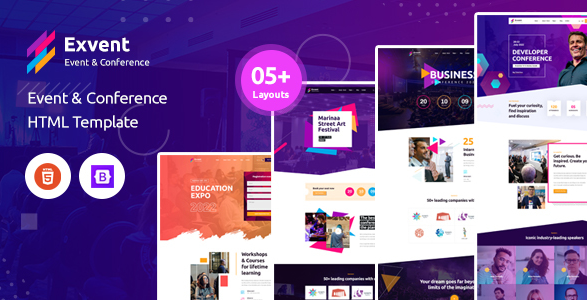
The Exvent HTML Template is a premium web template crafted specifically for event organizers, agencies, and companies looking to promote events online. The template’s design focuses on flexibility, making it easy to highlight event details, speakers, schedules, and ticketing information in an attractive format. With its modern design and fully customizable layout, Exvent is a go-to option for event planners who want to establish an engaging online presence.
Key Features of Exvent HTML Template
. Responsive Design
The Exvent HTML Template is built with a responsive design, ensuring that your website looks stunning on all devices—desktops, laptops, tablets, and smartphones. In today’s mobile-first world, a responsive design is essential, allowing users to easily browse event details on-the-go.
. Event-Specific Layouts
Exvent comes with pre-built, event-specific layouts that cater to the needs of various event types, such as conferences, festivals, workshops, webinars, and more. These layouts provide sections for crucial information such as event dates, venue details, speakers, schedules, and registration options, allowing for a seamless presentation of event information.
. Customizable Event Schedules
One of the standout features of the Exvent template is its event schedule management functionality. It includes sections for listing events with date, time, and session details, giving organizers the ability to display schedules in a clean, professional format. This is especially useful for multi-day conferences or workshops that need to present multiple sessions.
. Speaker and Team Profiles
For events that feature speakers, presenters, or performers, the template provides dedicated sections for showcasing individual profiles. These sections can include images, bios, social media links, and key topics the speakers will cover. Highlighting your event’s key personalities helps in creating more interest and engagement.
. Built-in Registration and Ticketing Sections
Exvent offers sections for online registration and ticket purchasing, allowing users to sign up for events directly through the website. These sections are easily customizable to integrate with popular ticketing platforms or registration systems, making it convenient for attendees to book tickets.
. SEO-Optimized
The Exvent HTML Template is designed with search engine optimization (SEO) in mind. It features clean code, fast loading times, and semantic HTML, all of which are critical for achieving higher rankings on search engines like Google. This helps attract more traffic to your event website.
. Cross-Browser Compatibility
To ensure a consistent experience for all users, Exvent is built to be compatible across all major web browsers, including Google Chrome, Mozilla Firefox, Safari, and Microsoft Edge. Regardless of what browser your attendees use, your site will look and function as intended.
. Blog and News Sections
A well-maintained blog or news section is an excellent way to keep attendees informed about the latest updates related to your event. Exvent includes a built-in blog layout, making it easy to post news, announcements, or articles that engage with your audience.
. Smooth Animations and Visual Elements
The Exvent template includes smooth animations, transitions, and visual elements that enhance the user experience without overwhelming the site’s performance. These aesthetic features help to create a modern, engaging website that attracts attention without compromising functionality.
Benefits of Using Exvent HTML Template
. Time and Cost Efficiency
Building a custom event website from scratch can be both time-consuming and expensive. The Exvent HTML Template provides a ready-made solution, saving you time and development costs while offering a professional design. It’s a cost-effective way to launch an event website quickly without sacrificing quality.
. Professional and Attractive Design
A well-designed website is crucial for attracting attendees and sponsors. The sleek and professional design of Exvent ensures that your event website will stand out. Its pre-designed layouts, paired with customizable options, make it easy to create a visually appealing website that resonates with your target audience.
. User-Friendly for Non-Developers
Even if you’re not a web developer, the Exvent template is designed to be user-friendly, with extensive documentation and straightforward customization options. You can easily modify the look and feel of your site by editing text, colors, images, and content without needing advanced coding skills.
. Enhanced Engagement and Conversion
By integrating features like speaker profiles, event schedules, and ticketing options, Exvent encourages visitor engagement. The intuitive design helps guide users through the event information, ultimately leading to more registrations, ticket purchases, and inquiries.
. Scalable for Future Events
Exvent is a highly scalable template. Whether you’re organizing a single event or managing multiple events throughout the year, the template can handle growing needs. You can easily duplicate or adapt sections for future events, making it a versatile choice for event organizers.
. Strong Community and Support
As a popular template, Exvent comes with a robust support network. Users can access documentation, video tutorials, and customer support to help resolve any issues or answer questions. Additionally, Exvent has a community of users who share tips, customizations, and advice.
How to Use Exvent HTML Template Effectively
: Installation
To get started, purchase and download the Exvent HTML Template files. Unzip the files and upload them to your web hosting platform via FTP or a file manager. Ensure that your hosting service supports HTML to avoid compatibility issues.
: Customize Your Template
Begin by customizing the layout to fit your event’s branding. Modify colors, fonts, and images to reflect your event’s theme. Update sections like the event schedule, speaker profiles, and venue information with your specific details. This customization helps create a unique and branded experience for visitors.
: Add Registration and Ticketing Features
Use the built-in registration forms or integrate a third-party ticketing platform such as Eventbrite or Ticketmaster. Ensure the registration process is seamless, user-friendly, and secure, so attendees can easily purchase tickets or sign up for the event.
: Optimize for SEO and Speed
Ensure that your content is SEO-optimized. Use relevant keywords in your meta descriptions, headings, and body text to improve search engine visibility. Compress images and enable caching to ensure fast loading times, which is critical for both user experience and SEO performance.
: Test and Launch
Test your website on multiple devices and browsers to ensure cross-compatibility. Check for broken links, loading speed issues, or design inconsistencies. Once everything looks and functions as expected, launch your website and start promoting it via email marketing, social media, and other promotional channels.